Clinical Software Version Update

Clinical Software Version Update 3160  dated 02/23/2026 is  available.


Posted in All Messages, Current Software Version Update | Leave a comment

Main Software Update

Update 7863 dated 02/20/2026 is available

Posted in All Messages | Leave a comment

Supervisor Approval to Physician Orders

Within the Main Software update 7844 (01/22/2026), an enhancement has been added to allow agencies to apply a Supervisor Approval signature to Physician’s Orders if needed.

The process is the same as adding Supervisor Approval to MSW or Therapy Assessment.

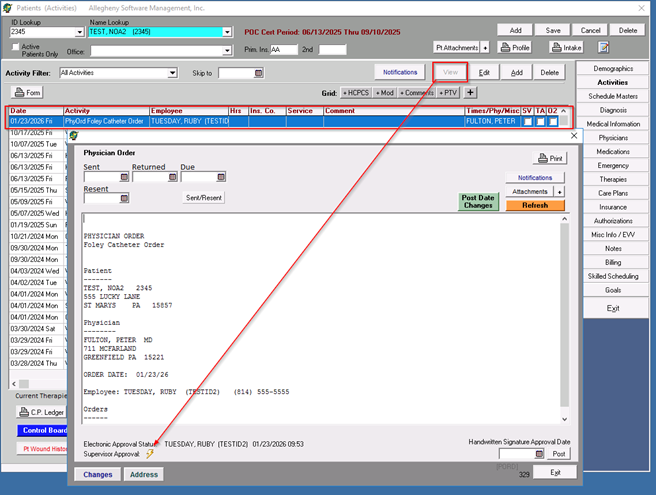
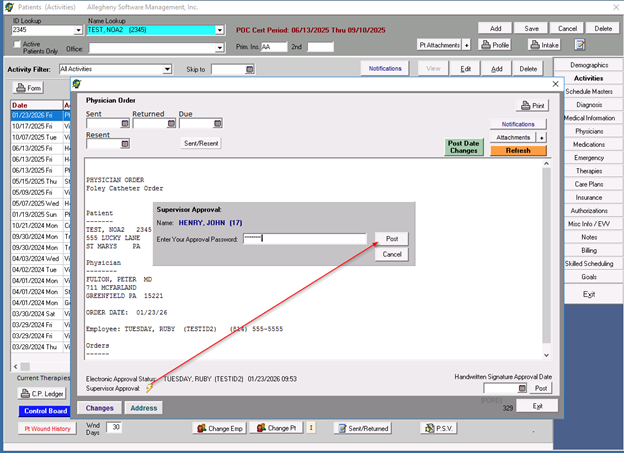
  1. To add Supervisor Approval, the user will highlight the order and click the VIEW button. A secondary window will appear, and the user will see a lightning bolt next to Supervisor Approval at the bottom of the screen.
  2. The user will click on the lightning bolt, and another window will appear for the Supervisor Approval. The user will enter their CLINICAL LOGIN PASSWORD and select post.**THIS PASSWORD IS THE USER’S CLINICAL LOGIN PASSWORD, NOT THEIR APPROVAL PASSWORD*

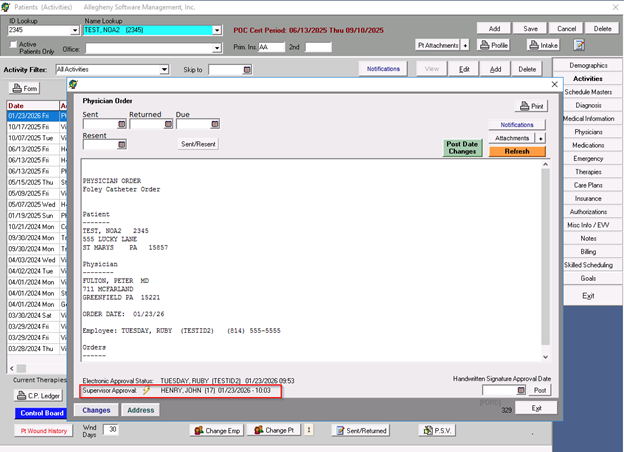
  3.  The Supervisor’s Name, date and time will now display
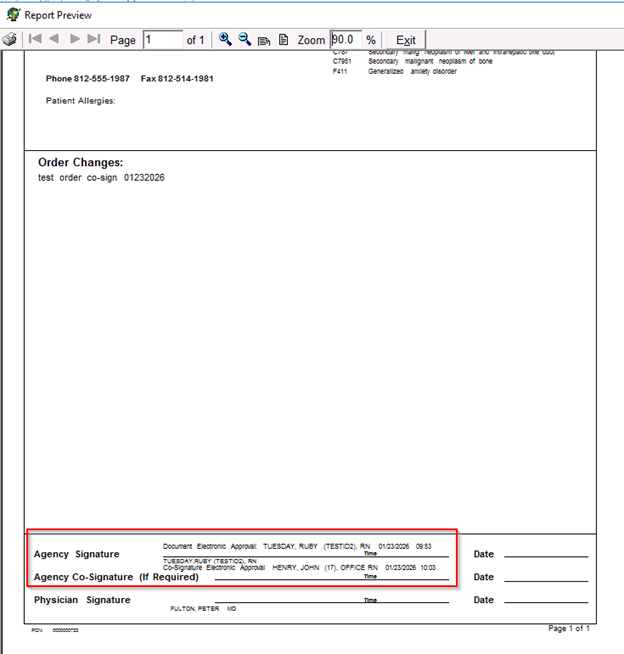
  4. Both the Clinician’s Approval and the Supervisor’s Approval will display at the bottom of the printed form along with the date and time the approval was done

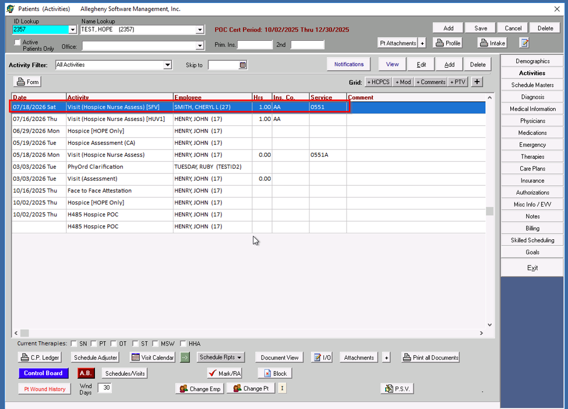
**The Supervisor Approval for Physician Orders can be applied from the Activities Screen and/or the Control Board>Pt Activity>Physician Orders within the Main Software. **

This enhancement will be available within the Clinical Software in the near future.

Posted in All Messages | Leave a comment

Main Software Version Update

Main Software Version Update 7834 dated 1/13/2026 includes screen enhancements to the Patients & Employees Screen.

Posted in All Messages | Leave a comment

2026 Federal Tax Table Update

The 2026 Federal Tax Tables are available with Update Version 7827 dated 12.29.2025.

Posted in All Messages | Leave a comment

New Quality Assurance Performance Improvement (QAPI) Feature

A new tool has been added to HHC3000 to aid in documenting and tracking information needed for some QAPI programs.   The new tab labeled QAPI is located within the NARRATIVE section of the visit notes/assessments has some new items including hospitalization, medication error, and complaints in addition to the falls and infection. Falls and infection documentation still remains in the Sensory and Musculoskeletal tabs and will pull to the QAPI if applicable.    This new QAPI tab is located in both the Skilled Nursing and Therapy notes/assessments.  It also has a link for Incident Reports if necessary.

In addition to the new documentation fields, the Fall and Infection History Tracking report has been reconfigured to include new items.  The 2 reports have been combined into one new report labeled “Patient Falls, Infections, Hospitalizations…” It remains in the same location Reporting>Clinical.

The new report configuration has the option to include one or multiple QAPI items in one report.

The report now displays all of the QAPI items selected and will indicate if an Incident Report has been entered from the QAPI screen for the coinciding item.  It displays with an “!” in the I/R column.  (see highlighted column below)

This feature is included in:

Main Version 7769 (10/07/2025)

Clinical Version 3110 (10/07/20285)


Posted in All Messages | Leave a comment

HOPE Tracking Tool

A new feature to assist in tracking Hospice HOPE Admission Assessments, Hope Update Visits, and Symptom Follow-up Visits has been added to the Control Board with in the Main Software (Version 7765 dated 09/30/2025)

This tool is found on the Control Board>Pt Status>Hospice HOPE

The grid displays:

  • Notice of Election Date
  • HOPE Admission Assessment Date
  • Document Day (day 0-5 from the Notice of Election Date)
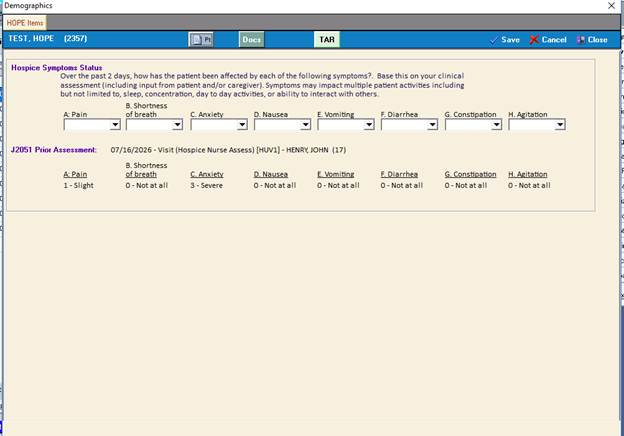
  • Symptom Impact Level(J2051)– (S.I.)-the highest rating charted in the assessment
  • Symptom Follow-up Visit (J2052) if applicable
  • HUV1 Period Dates
  • HUV1 Assessment Date Performed
  • HUV2 Assessment Period
  • HUV2 Assessment Date Performed.

When highlighted on a patient, user will see the specifics information related to the HOPE Admission, HUV1 and HUV2 at the bottom of the screen.

Posted in All Messages | Leave a comment

HOPE Assessment

Hospice Outcomes and Patient Evaluation (HOPE) Assessment is now available for HHC3000 Main, Version 7764 dated 9/29/2025 and Clinical Software Version 3103 dated 9/29/2025. HOPE assessments are required for visits dated 10/1/2025 and/or with a Date Assessment Completed of 10/1/2025 or later.

The HOPE tool will replace the HIS tool for Hospice.

HOPE Admission:

When Adding the Hospice Assessment (CA), and the visit is dated for 10/1/2025 or later, the visit will include an option to select “Include Hospice HOPE” or “Hospice HOPE Only”. The user will select which item is required.

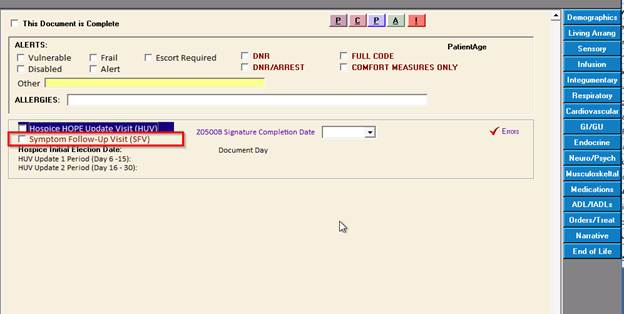
After a Hospice Initial Election date is entered into the Insurance area of the software, the Hospice Assessment will display the Hospice Initial Election Date, along with the HUV 1 & 2 Periods of when they should be completed, along with the Document Day.

HUV 1 & 2:

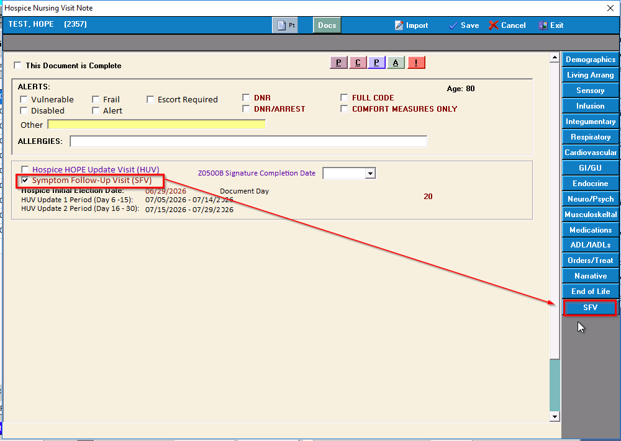
HUV 1 & 2 Visits are added from within the Hospice Nursing Assessment. There will be a checkmark within the Hospice Nursing Assessment to select as Hospice HOPE Update Visit.

HOPE Discharge:

HOPE Discharge will be done how HIS has been done historically. User will add a Discharge from Agency Activity, and complete items under Hospice Reporting.

Posted in All Messages | Leave a comment

Enhancement Main/Clinical Software

A new enhancement has been added to the software.  This enhancement will alert a second user when another user is currently editing a Visit record.  This currently only applies to routine visit documentation and not comprehensive assessments.

The second user will see an alert when they try to edit a routine visit record that someone else is currently working on.  The edit lock should remove itself when the first user exits the record.

If the recorded needs to be unlocked manually, a Main user may unlock the record via the Activities Screen>VIEW BUTTON.  If the record is locked, there will be a ‘lock’ symbol at the bottom of the VIEW screen.  Users can click that lock symbol and unlock the record.

This new feature is included in the Main software version 7708 (05/28/2025) and Clinical 3072 (05/27/2025) for our CLOUD users.  This enhancement is not applicable for server-based software.

Edit Locking Alert 05232025

Posted in All Messages | Leave a comment

History of Sent Dates for PHYSICIAN ORDERS

A new feature has been added to the Main Software to be able to view the history of when a user has marked that a PHYSICIAN ORDER has been sent, resent, and returned.

When a user enters or updates a date that a PHYSICIAN ORDER has been SENT, RESENT, and/or RETURNED, the software records the date, time and user that made the change

This feature is available with the 7625 (01/21/2025) Main Software update.

See attached for instructions. History of Physician Order Sent Dates 01232025

Posted in All Messages | Leave a comment